Opening a Melbet account from Zambia takes only a couple of minutes, but the choices you make at sign-up decide how smoothly your first withdrawal goes. This guide covers all four registration methods, which one Zambian bettors should pick, and how to get your details right the first time so your Kwacha payouts are never stuck in verification.
The four ways to register
Melbet offers four sign-up routes. They all create the same account — the difference is speed now versus friction later:
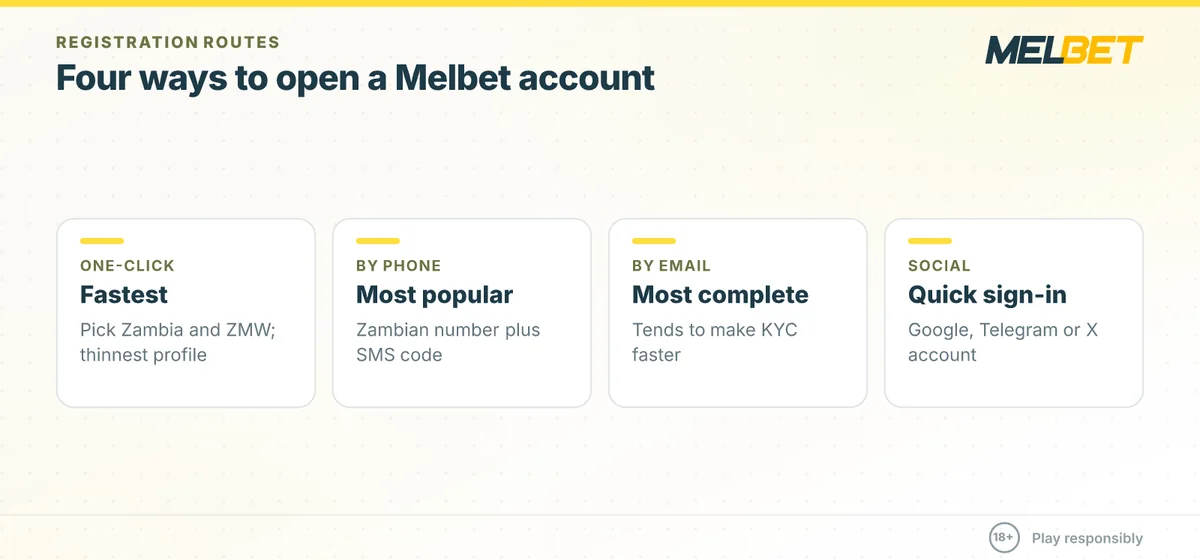
- One-click: pick country (Zambia) and currency (ZMW) and the system generates login details. Fastest, but the thinnest profile — you must add real details before withdrawing.
- By phone: the most popular method — enter your Zambian mobile number and confirm with an SMS code.
- By email: the most complete profile from the start, which tends to make KYC faster.
- By social / messenger: link a Google, Telegram or X account for a quick sign-in.
For Zambian users we recommend phone or email registration with the ZMW currency selected. Choosing ZMW at sign-up means your Airtel Money, MTN MoMo and Zamtel deposits and withdrawals stay in Kwacha with no conversion friction.
Register on MelbetHow to register a Melbet account in Zambia
Step-by-step (phone method)
- Open the current official Melbet site or app.
- Tap Registration and choose the By phone tab.
- Select Zambia (+260), enter your number and set ZMW as the currency.
- Choose the Sports or Casino welcome offer and enter a promo code if you have one.
- Confirm the SMS code, set a strong password and accept the 18+ terms.
Immediately after, open My Account → Personal details and complete your full name, date of birth and email. This is the single most useful thing you can do at sign-up.
Why your details must match — KYC explained
Before your first withdrawal, Melbet requires KYC verification: a government ID (front and back), often a selfie, and sometimes proof of address. Verification usually takes 24–72 hours. The name and date of birth on your account must exactly match your ID, and your phone and email must be confirmed. If they do not match, payouts get held — the most common avoidable problem Zambian bettors report.
Get verified faster
- Register with your legal name exactly as on your NRC or passport.
- Confirm your email and phone straight away.
- Upload clear, uncropped ID photos in good light.
- Complete KYC before you win, not after — do it on day one.
Choosing your welcome offer
At registration you pick either the Sports or the Casino welcome bonus — you cannot have both. The Sports offer is a 100% match on your first deposit; the Casino offer spreads across your first few deposits with free spins. Exact ceilings and wagering terms are time-sensitive and set per country, so confirm the current ZMW figures on the operator’s promotions page. Our Melbet Zambia bonus guide breaks the mechanics down.
What to have ready before you sign up
Registration itself takes two minutes, but verification later is smoother if you prepare a few things now:
- Your NRC or passport, with the name spelled exactly as you will enter it.
- A mobile-money number registered in your own name — the same one you will deposit and withdraw with.
- An email address you can access to confirm the account.
- A strong, unique password you do not use elsewhere.
Getting these lined up means you can complete both registration and the start of KYC in a single sitting, rather than scrambling when you want your first payout.
Securing your account
Because your account holds real money, treat it like a bank login. Use a password you do not reuse, enable biometric login in the app so a stolen password alone is not enough, and never share your login or one-time SMS codes with anyone — Melbet support will never ask for them. If you bet from a shared device, always log out fully rather than staying signed in.
Responsible tools available at sign-up
From day one your account includes responsible-gambling controls: daily, weekly and monthly deposit limits, loss and session limits, and self-exclusion for a chosen period. A useful, verifiable detail: lowering a limit takes effect immediately, while raising one is delayed (around 24 hours) as a cooling-off measure. Setting a sensible deposit limit at registration is the easiest way to keep betting fun.
Login problems and fixes
- Forgot password: use Forgot password with your registered phone/email.
- No SMS code: check signal, request a resend, or try email registration instead.
- Account ID lost: one-click accounts issue an ID number — save it, or link an email/phone so you can recover it.
Related Betmavo guides
- Download the Melbet app
- Deposit with Airtel Money & MTN
- Melbet Zambia bonus & promo code
- Is Melbet legit in Zambia?
Responsible Gambling & Age Notice
Betting must always be for entertainment, never a way to make money or recover losses. You must be 18 or older to open a Melbet account. If betting stops being fun, use the account tools to set daily deposit, loss and session limits, or self-exclude. Free, confidential support is available worldwide from GamCare and Gambling Therapy. See our responsible gambling page for more.
About this guide: Betmavo is an independent information resource. We are not the official Melbet website and we are not operated by or affiliated with the operator. Melbet is run by Pelican Entertainment B.V. under a Curaçao gaming licence. Betmavo may earn a commission when readers use links on this page. All bonus figures, limits and links are time-sensitive — always confirm the current terms on the operator’s own site before depositing.
Register on Melbet
Comments
No comments yet.